


Weather the Trip
3.537.00 Reviews
App Specs
- Version
- 2.50-googleplay
- Updated On
- License
- Free
- Downloads
- 10,000+
- Developer
- Witt Software
- Categories
- Weather
- Platform
- Android
Screenshots
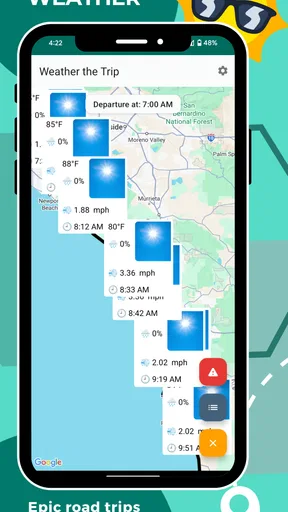
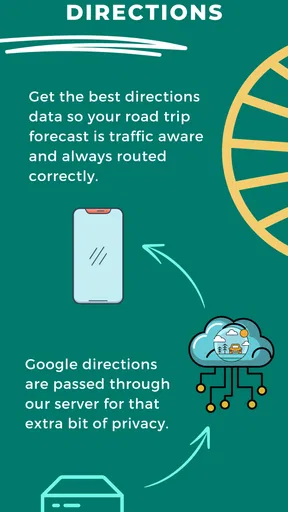
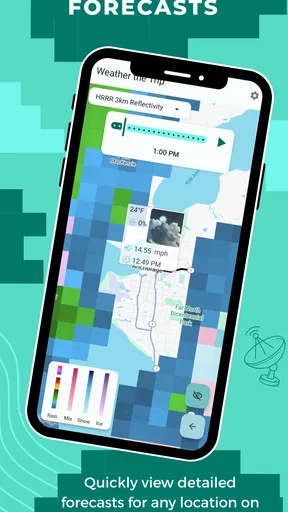
 Analysis by AppCompare
Planning a long drive is different from checking whether it will rain during lunch. A normal weather app usually answers the question, “What is happening where I am now?” Weather the Trip takes a more useful approach for drivers: it is built around the weather along a journey, not just at a single location. I found that change in perspective valuable when a route crossed several towns or regions and the forecast at departure no longer represented what I would meet later.
This is a free weather app from Witt Software, rated for Everyone and available for Android devices running at least version twelve of the operating system. It has passed ten thousand installs, with an average rating of three and a half from seventy-two ratings and thirty-seven written reviews. Those numbers suggest a small, mixed user base rather than a universally polished favorite, and that matches my experience: the idea is practical, but its usefulness depends heavily on how deliberately you use it.
The current release is version 2.50-googleplay. There are optional in-app purchases ranging from two dollars and ninety-nine cents to twenty dollars and twenty-three cents per item, so I would treat the free installation as a chance to test the workflow before spending anything. For occasional weekend travel, the free experience may be enough. Frequent road trippers will want to decide whether the additional paid options fit their planning habits.
How I use it before setting out
My baseline workflow starts with the route itself rather than with a favorite city. I first think through the actual drive: where I will leave, which major areas I will pass, and where I might stop if conditions become unpleasant. Then I use the app to inspect the weather as a sequence instead of treating the entire trip as one forecast. That simple habit prevents a common mistake: assuming that a clear morning at home means the whole drive will be comfortable.
This is especially helpful on trips where the first part of the route is ordinary but the later section has a different outlook. A departure forecast can look reassuring while the destination or a midpoint raises a separate concern. Looking at the journey in stages gives me a better basis for deciding when to leave, whether to build in extra time, or whether an outdoor stop should be moved earlier.
I would not use this app as a replacement for careful driving decisions. Forecasts are planning aids, not guarantees, and a road-trip view can make information easier to organize without making it more certain. Before leaving, I still check current road conditions, official travel notices, and the latest local forecast when the journey involves severe weather, remote roads, or a tight arrival time.
A realistic weekend example
Imagine leaving home early for a coastal day trip. The first stretch may be dry and comfortable, while the forecast farther along the route suggests a wetter afternoon. With a conventional weather app, I might check home and destination separately, then forget to connect the two pieces. Here, I can make the route the subject of the planning session and decide whether the outdoor part of the day belongs near the beginning, whether a flexible stop is wiser, or whether the drive should wait.
Worth Reading Before You Choose

EA SPORTS FC Mobile 26 Is a Bigger Football Game, but It Takes Time

Flipboard Shows What News Apps Must Do Beyond the Feed

Switching to Android Auto Means Rethinking Your Driving Routine

Google Calendar Makes a Crowded Week Easier to Manage

Ludo King Makes the Most of the Minutes Between Plans

Baby Panda World Brings Quick Play to Modern Phones, but Its Game Library Feels Busy
The useful insight is not simply seeing more forecasts. It is changing the question from “What is the weather there?” to “How will the weather change while I am getting there?” That is a better mental model for driving, especially when the trip lasts long enough for conditions to shift.
I also found the app more useful before a journey than during one. A passenger can review information while the vehicle is parked, but I would not encourage a driver to interact with any weather app while moving. Saving a route in my own notes and checking the app at planned breaks creates a safer repeatable routine than trying to monitor every change continuously.
What it does better than a usual weather app
Most mainstream weather apps are excellent at quick local checks. They often open directly to the current location, display familiar hourly information, and provide alerts or radar-oriented tools. That makes them better for deciding whether to walk the dog, hang laundry, or leave the office with an umbrella.
Weather the Trip has a narrower strength. Its value appears when several locations matter in one decision. Instead of mentally stitching together separate city searches, I can think about a complete drive. That reduces the chance of overlooking the middle of a route, which is exactly where a long journey can become uncomfortable or unsafe.
The trade-off is that a dedicated road-trip forecast is not automatically the best everyday weather companion. If I only need a quick glance at today's temperature, a familiar general-purpose app may feel faster. If I want extensive radar, highly detailed local observations, or a broad collection of lifestyle widgets, another weather service may be a better fit. This app earns its place when travel planning is the central task.
Settings, shortcuts, and habits that make it more useful
I recommend spending a few minutes checking the available settings before judging the app from its first screen. The important question is not how many controls appear, but whether the presentation suits the way you travel. A route forecast can become cluttered if I try to inspect every detail at once, so I prefer a consistent order: departure area, meaningful midpoint, destination, then any planned stop.
That order is a small but effective shortcut. It turns each review into a repeatable checklist and makes changes easier to notice. If I check the same route again later, I am comparing like with like rather than jumping between random locations. This is one of the more advanced benefits of the app: the value comes from disciplined use, not from tapping through every available screen.
Location handling is another setting worth treating carefully. A road trip may begin near one address, pass through a different town, and end somewhere that does not resemble the destination name I first entered. I take a moment to confirm that the selected places represent the actual journey. A forecast is only as useful as the locations being compared, and an incorrectly chosen stop can create false confidence.
For repeat travelers, I would build a simple habit around the app. Review the trip once several days before departure to identify broad timing concerns, then check again closer to leaving. On the final review, focus on decisions that can still change: departure time, break location, outdoor activities, and whether a backup plan is needed. This keeps the app from becoming a source of endless forecast watching.
Use the route as a decision tool, not a scrolling exercise
A common mistake is to read every available forecast detail without deciding what action it should influence. I get more from the app when I attach each observation to a practical choice. If conditions look worse later in the journey, I ask whether an earlier start helps. If a stop appears less attractive than expected, I identify an alternative before leaving. If the forecast is similar across the route, I stop checking and move on.
This approach also helps with uncertainty. Weather can change, and a long route naturally includes more opportunities for conditions to differ from the forecast. Rather than treating every variation as a reason to cancel, I use the information to preserve flexibility. A flexible lunch stop, an indoor destination, or extra travel time can matter more than trying to predict the exact minute conditions will change.
Another practical shortcut is to separate essential information from comfort information. Rain, wind, visibility, and temperature may affect safety or timing, while sunshine may mainly affect enjoyment. I start with the factors that could change the route itself. Only after that do I consider whether the weather is ideal for a picnic, scenic viewpoint, or other optional activity.
Where the free model fits
The app costs nothing to install, which makes experimentation straightforward. I would begin with a real upcoming journey rather than a casual test location, because the road-trip concept is easier to judge when several places and times matter. If the free version supports the planning style I need, that may be all I require.
Optional purchases are available individually, priced from two dollars and ninety-nine cents to twenty dollars and twenty-three cents. I would not buy an item simply because a feature sounds useful in isolation. First I would ask how often I take long drives, whether the free workflow already saves me time, and whether the paid option removes a genuine recurring frustration. Occasional travelers should be particularly cautious about paying for convenience they may use only a few times each year.
The small user base also affects how I evaluate it. An average rating of three and a half is neither a strong endorsement nor a reason to dismiss the concept. I would read recent store feedback before purchasing anything and test the app across the kinds of routes I actually drive. A tool can be excellent for multi-stop planning while still feeling less polished than a large weather platform in everyday use.
Advanced limits I would keep in mind
The first limitation is scope. The app is designed around comprehensive weather forecasts for road trips, but that focus does not mean it replaces every travel resource. It does not remove the need to check traffic, closures, fuel planning, vehicle readiness, or local safety guidance. Weather is one layer of a journey, and the app works best when I combine it with those other checks.
The second limitation is the difficulty of interpreting a long route. More information can improve planning, but it can also create the illusion of precision. A forecast for several points along a drive does not tell me exactly what will happen between those points. I avoid treating the route as a continuous guarantee. Instead, I use it to identify broad patterns and possible trouble spots, then leave room for conditions to vary.
The third issue is timing. A road trip can span enough hours for the forecast to evolve while I am still traveling. That means the app is most valuable when it supports decisions that can be revisited. I like planning a few sensible check-in moments, such as before departure and during a proper rest stop, rather than constantly refreshing. If the journey is weather-sensitive, I make sure someone else can monitor updates or I pull over before checking.
There is also a difference between planning a route and navigating it. I would not choose this app as my primary navigation tool, and I would not expect it to replace turn-by-turn directions. Its role is to help me understand weather across the journey so that navigation, timing, and stop choices can be made with better context. Keeping those roles separate makes the overall setup less confusing.
Who should install it, and who should skip it
I think it is a good match for people who regularly drive between cities, plan scenic routes, organize outdoor weekends, or travel with stops that depend on comfortable conditions. It is also useful for anyone who has been caught by the “clear here, poor there” problem and wants a more deliberate way to compare the journey rather than checking isolated places.
I would skip it if my weather needs are almost entirely local. For a quick morning temperature check, a standard weather app is likely more convenient. I would also look elsewhere if my priority is a deep radar experience, extensive alerts, or a large ecosystem of widgets and integrations. The focused road-trip idea is its main advantage, but that focus naturally leaves other weather tasks to competing apps.
Families and groups may benefit from the planning style even when nobody is a weather enthusiast. Before a shared trip, one person can review the route and identify likely changes to stops or timing. That is more useful than sending everyone a series of disconnected screenshots from different towns. The app does not make the decision for the group, but it gives the conversation a clearer structure.
My repeatable road-trip routine
For a trip I care about, I use this five-part routine. First, I identify the real start and end points. Second, I include only the stops that could change the plan. Third, I compare the journey at the time I expect to be driving rather than looking only at today's conditions. Fourth, I decide what would trigger a change, such as moving an outdoor activity or adding a break. Finally, I check again close to departure and avoid making the driver responsible for live monitoring.
The third step is easy to overlook. A destination may have pleasant weather later in the day, but that does not help if the route gets difficult during the hours I will be on the road. Matching the forecast review to the actual travel window makes the app much more practical. It also prevents me from overreacting to conditions that will be irrelevant by the time I arrive.
My other tip is to keep the number of decision points realistic. Adding every town along a route may feel thorough, but it can make the result harder to interpret. I prefer the departure area, one or two meaningful midpoints, the destination, and any stop tied to a reservation or outdoor plan. This balance gives me useful coverage without turning preparation into a research project.
Finally, I treat a forecast disagreement as a prompt to investigate, not as proof that the app is wrong. If another trusted source shows a noticeably different outlook, I compare the locations, times, and update moments before deciding. Different services may be describing slightly different points or forecast windows. That extra check is worthwhile when the trip involves mountain roads, exposed coastlines, or a strict schedule.
My verdict after using it as a planning companion
The strongest reason to choose Weather the Trip is its route-first way of thinking. It addresses a real weakness in ordinary weather apps: they make it easy to check where I am, but less easy to understand what I will encounter on the way somewhere else. For long drives, that distinction can improve timing, stop selection, and backup planning.
I also appreciate that the app is easy to try because it is free and carries an Everyone age rating. Android users on version twelve or newer can see whether the workflow suits them without committing money immediately. The optional purchases deserve a careful decision, though, especially for travelers who take only a few road trips each year.
My reservations are just as clear. The app cannot replace navigation, road information, official warnings, or common sense. A route forecast can organize information, but it cannot provide certainty between forecast points. The modest three-and-a-half average rating tells me to approach it as a focused tool with room for friction rather than as a flawless all-purpose weather solution.
In the end, I would recommend it to a friend who often plans journeys around changing weather and wants a repeatable pre-drive routine. I would not recommend installing it solely for everyday local forecasts, where a conventional weather app may be quicker and broader. Used with sensible settings, a small number of meaningful checkpoints, and a second look at important safety information, it becomes a useful planning layer. Used as a promise that the entire route will unfold exactly as shown, it will disappoint.
That distinction captures my experience: this is not the weather app I reach for every time I wonder whether to take an umbrella. It is the one I would consider when the weather along the road matters as much as the weather at the destination.
Pros
- Clear weather forecasts help plan trips with more confidence.
- Useful travel-focused information in a simple
- accessible layout.
- Can reduce the need to check several weather sources before traveling.
- Helpful for comparing conditions across different destinations.
- Convenient for checking weather updates while on the go.
Cons
- Forecast accuracy may vary depending on the destination and data source.
- Some features may require an internet connection to update properly.
- Weather details may be less comprehensive than in dedicated weather apps.
- Frequent travelers may find limited value without multiple destinations saved.
- Notifications or extra features could increase battery and data usage.
FAQs for Weather the Trip
What is Weather the Trip, and what does the app do?
Weather the Trip is a travel-focused weather application designed to help you check conditions before and during a journey. Instead of viewing only the weather at your current location, you can use it to plan around destinations, travel dates, and changing conditions along your route. It is useful for road trips, vacations, outdoor activities, and anyone who wants more context than a basic daily forecast provides.
Can Weather the Trip help me plan weather conditions for an entire journey?
Yes, the main appeal of Weather the Trip is its trip-oriented approach to forecasting. Depending on the route and information you enter, the app can help you consider weather at different stops or destinations rather than relying on a single forecast. This makes it easier to prepare clothing, driving plans, outdoor activities, and backup arrangements. However, forecasts become less reliable further into the future, so important decisions should be checked again closer to departure.
Is Weather the Trip accurate enough for travel and outdoor activities?
Weather the Trip can be a helpful planning tool, but no weather application can guarantee perfect predictions. Forecast accuracy depends on location, forecast range, local conditions, and the data sources used by the service. In our experience, it is best for comparing general trends such as rain, temperature, wind, or severe-weather possibilities. For flights, hiking, boating, or dangerous conditions, confirm details with official local weather authorities.
Does Weather the Trip require location access or an internet connection?
The app may request location permission to identify your current position and provide relevant forecasts, although you can often enter destinations manually if you prefer not to share precise location data. An internet connection is generally needed to retrieve updated weather information and route forecasts. Before traveling through areas with weak coverage, check whether the app supports saved trips or cached information, and avoid assuming that older forecasts will remain current.
Is Weather the Trip free to download, and are there in-app purchases?
Weather the Trip may be available to download without an upfront charge, but the exact pricing model can vary by platform, region, and app version. Some features may be supported by advertising or offered through optional subscriptions or in-app purchases. Before downloading, review the current Google Play or App Store listing for premium features, trial terms, renewal conditions, and any limitations affecting the number of trips, forecasts, or saved locations.


